REPOSITORY
Page History
...
An active directory (Microsoft AD or similar)
Domain joined computers
A certification authority (CA)
Smart cards or YubiKeys
The computers using the service must have Net iD Client installed. Go to this page for system requirements: Check the system requirements of the version of Net iD Client that you use, https://docs.pointsharp.com/net-id-client/latest/nic-release-notes/nic-113-system-requirements.html.
Mandatory procedures
PoSC Net iD must have a public key infrastructure (PKI) when using the certificate trust model. The domain controllers must have a certificate, which serves as a root of trust for clients. The certificate ensures that clients don't communicate with rogue domain controllers. The certificate trust model extends certificate issuance to client computers. Later during the issuing process, the users receive a sign-in certificate.
...
Go to Computer\HKEY_LOCAL_MACHINE\SOFTWARE\PoliciesPointsharp\SecMaker\NetiD\_Client\Plugin\AllowURL.
Create two keys with the following values:
Name Data 01 https://*.secmakerliveid.com,full 022 https://*.pointsharpsecurecloud.com,full 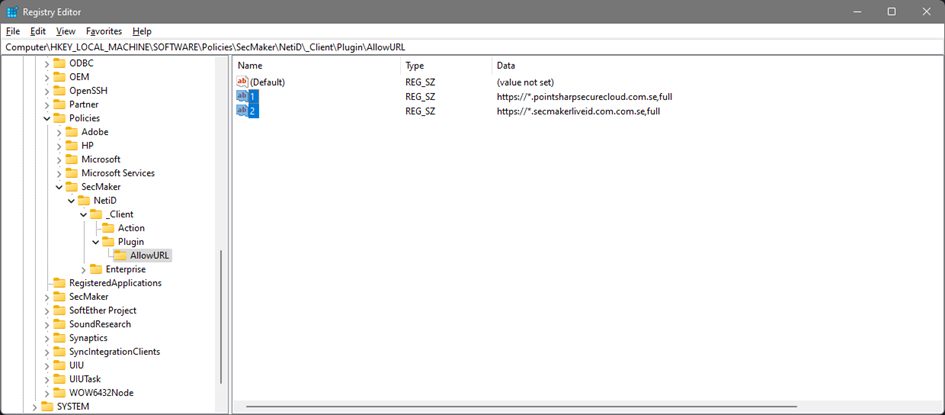
- When done, your browser utilizes the Net iD Web-extension to be able to communicate with the hardware on your computer.

...
Information and troubleshooting
Web browser support
Check the system requirements of the version of Net iD Client that you use, https://docs.pointsharp.com/net-id-client/latest/nic-release-notes/nic-113-system-requirements.html.
Troubleshooting
Turn on CAPI2 logging
...
Overview
Content Tools